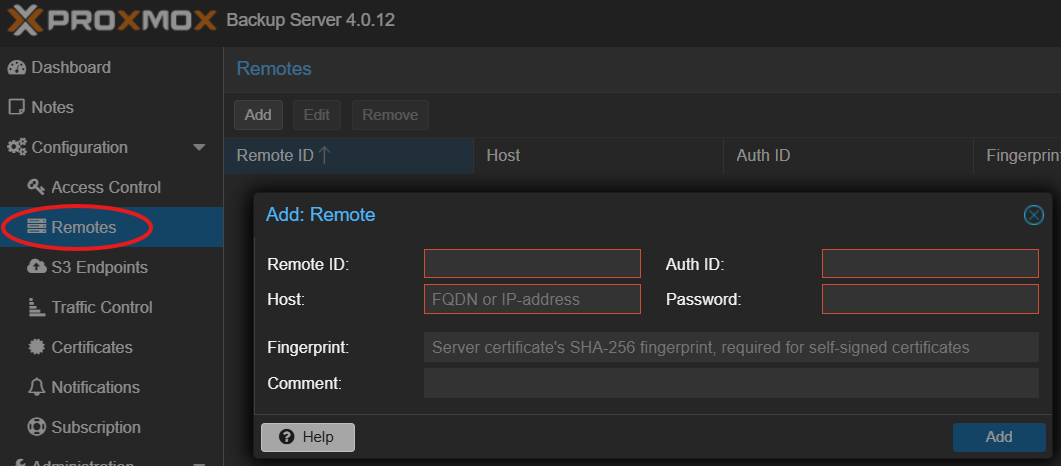
Note: How to get the fingerprint from self signed certificate is shown in [Install Minio S3 Storage Server on Debian/Ubuntu](https://wiki.hdd-housing.eu/books/setup/page/install-minio-s3-storage-server-on-debianubuntu "Install Minio S3 Storage Server on Debian/Ubuntu")
## Create Datastore ``` mkdir /tmp/hddhousing_localcache ``` Click `Add Datastore` and configure to your needs, example: [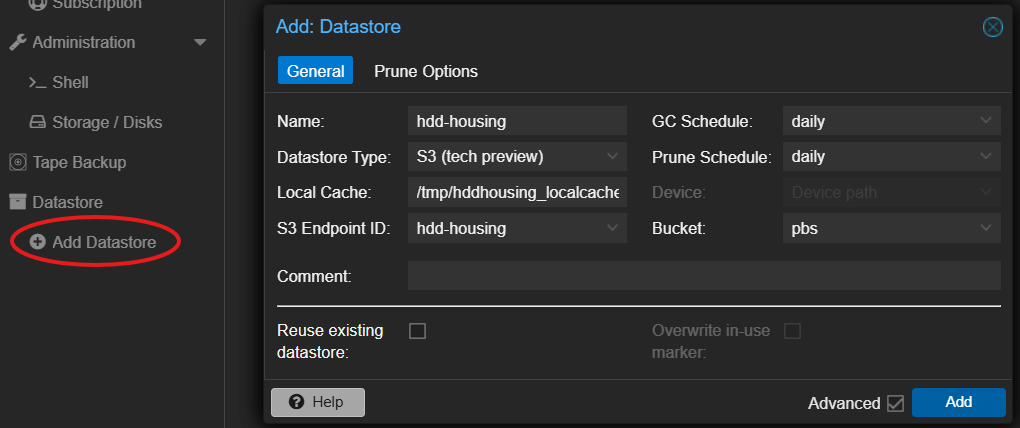](https://wiki.hdd-housing.eu/uploads/images/gallery/2025-08/DhZimage.png) ## Create namespaces [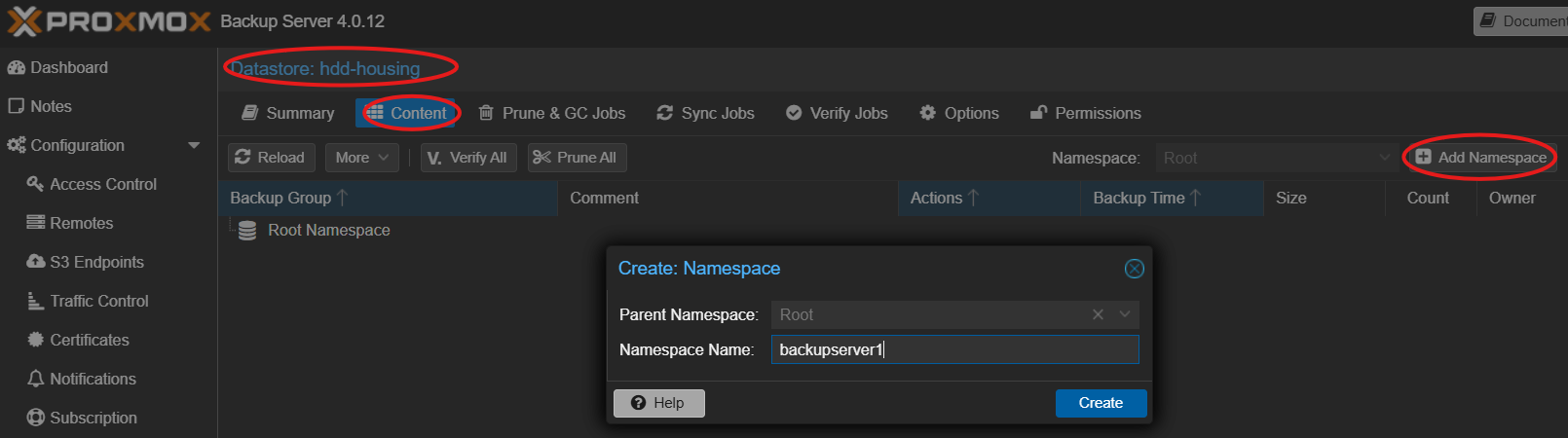](https://wiki.hdd-housing.eu/uploads/images/gallery/2025-08/UUUimage.png) ## Use namespaces for Pull Sync Jobs [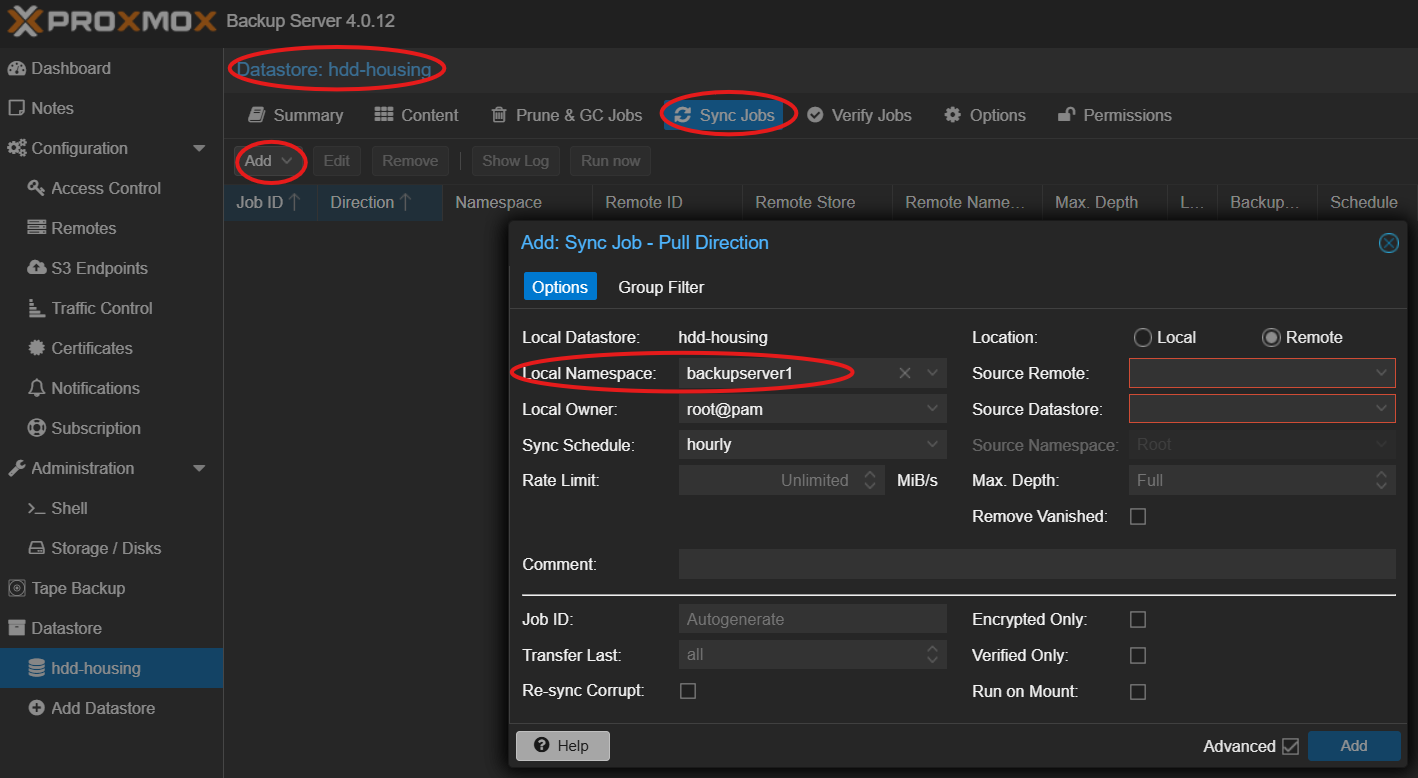](https://wiki.hdd-housing.eu/uploads/images/gallery/2025-08/YQQimage.png)Remotes must be configured first, see screenshot below. Click the Help button for further assistance.
[](https://wiki.hdd-housing.eu/uploads/images/gallery/2025-08/wqTimage.png) # iCloud This article [https://www.heise.de/news/iCloud-Daten-Mac-App-sichert-Drive-und-Fotos-10508960.html](https://www.heise.de/news/iCloud-Daten-Mac-App-sichert-Drive-und-Fotos-10508960.html) (for macOS, behind paywall and in german) describes some options like [https://www.parachuteapps.com/parachute](https://www.parachuteapps.com/parachute) and [https://support.bombich.com/hc/en-us/articles/20686419951767-Backing-up-the-content-of-cloud-storage-volumes](https://support.bombich.com/hc/en-us/articles/20686419951767-Backing-up-the-content-of-cloud-storage-volumes) Currently we have no Apple devices to try them out ourselves. # BorgBackup BorgBackup (Borg for short) provides: - Space-efficient storage of backups. - Secure, authenticated encryption. - Compression: lz4, zstd, zlib, lzma, or none. - Mountable backups with FUSE. - Easy installation on multiple platforms: Linux, macOS, BSD, ... - Free software (BSD license). - Backed by a large and active open-source community. It is available for - Linux - FreeBSD - MacOS [https://www.borgbackup.org/](https://www.borgbackup.org/) ## Configure HDD-Housing S3 Storage in BorgBackup # Nextcloud This articel describes how to backup Nextcloud to S3 Storage hosted by HDD-Housing. ## Configure HDD-Housing S3 Storage in Rclone #### 1. Configure S3 Remote Install rclone and run: ``` rclone config ``` Follow the prompts to create a new remote (name it mys3) using the s3 provider. #### 2. Create a Backup Script A proper backup requires a database dump before the transfer. Create a script (backup.sh): ``` # 1. Put Nextcloud in maintenance mode sudo -u www-data php /var/www/nextcloud/occ maintenance:mode --on # 2. Dump the database (example for MariaDB) mysqldump --single-transaction -u [user] -p[password] [db_name] > /tmp/nextcloud-db.sql # 3. Sync to S3 (Data + Config + DB Dump) rclone sync /var/www/nextcloud/data mys3:my-bucket/data/ rclone sync /var/www/nextcloud/config mys3:my-bucket/config/ rclone copy /tmp/nextcloud-db.sql mys3:my-bucket/database/ # 4. Turn off maintenance mode sudo -u www-data php /var/www/nextcloud/occ maintenance:mode --off ``` # Restic ## Install Restic ``` apt update apt install restic ``` ## Configure Create `restic_env.sh` with content: ``` export AWS_ACCESS_KEY_ID="access_key" export AWS_SECRET_ACCESS_KEY="secret_key" export RESTIC_REPOSITORY="s3:http://IP-OR-DNS:7070/bucket" # Password for Restic-Encryption (DO NOT LOOSE! MANDATORY FOR RESTORE!) export RESTIC_PASSWORD="good_password_that_you_never_forget" ``` Then init the repo ``` source restic_env.sh restic init ``` ## Backup Script Create `restic_backup.sh` with content: ``` export AWS_ACCESS_KEY_ID="access_key" export AWS_SECRET_ACCESS_KEY="secret_key" export RESTIC_REPOSITORY="s3:http://IP-OR-DNS:7070/bucket" export RESTIC_PASSWORD="good_password_that_you_never_forget" #Backups all listed paths to one restic snapshot restic backup /etc /var/www /home/user/data ```