Backup
Synology Hyper Backup
Links
Language can be changed on bottom right
Supported Models
https://www.synology.com/en-global/dsm/packages/HyperBackup
Hyper Backup Technical Specifications
https://www.synology.com/en-global/dsm/7.2/software_spec/hyper_backup
Hyper Backup Quick Start Guide
https://kb.synology.com/en-global/DSM/tutorial/Quick_Start_Hyper_Backup
Hyper Backup Data Backup
https://kb.synology.com/en-global/DSM/help/HyperBackup/data_backup?version=7
Syncthing
Syncthing is generally not a backup tool. But as we use snapshots on the ZFS pool, which can't be destroyed from syncthing, it's not a plain syncing tool which in the worst case would sync ransomware encrypted files in real time and cause data loss on all devices.
The Syncthing GUI will be available through the provided link after deployment.
To prefill the Syncthing dataset on your ZFS pool before sending it, install as described in Install Syncthing. You don't need to do this if you don't want to prefill the pool on your site.
Proxmox Backup Server 4
The use of a separate Proxmox Backup Server for uploading backups from another Proxmox Backup Server on HDD-Housing may offer greater security against ransomware and attackers. The Proxmox Backup Server connected to HDD-Housing should be operated in pull mode. If operating in push mode is necessary, you can find the necessary permissions here: https://pbs.proxmox.com/docs/managing-remotes.html#sync-direction-push
If you want to backup multiple Proxmox Backup Server, use namespaces or create seperate buckets and a Datastore for each bucket.
Documentation Proxmox Backup Server: https://pbs.proxmox.com/docs/index.html
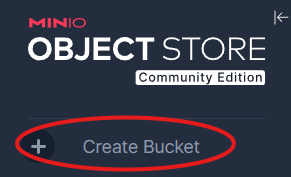
Create a bucket in Minio
By clicking Create Bucket in Webgui on the top left and name it pbs:
Configure HDD-Housing S3 Storage in Proxmox Backup Server 4
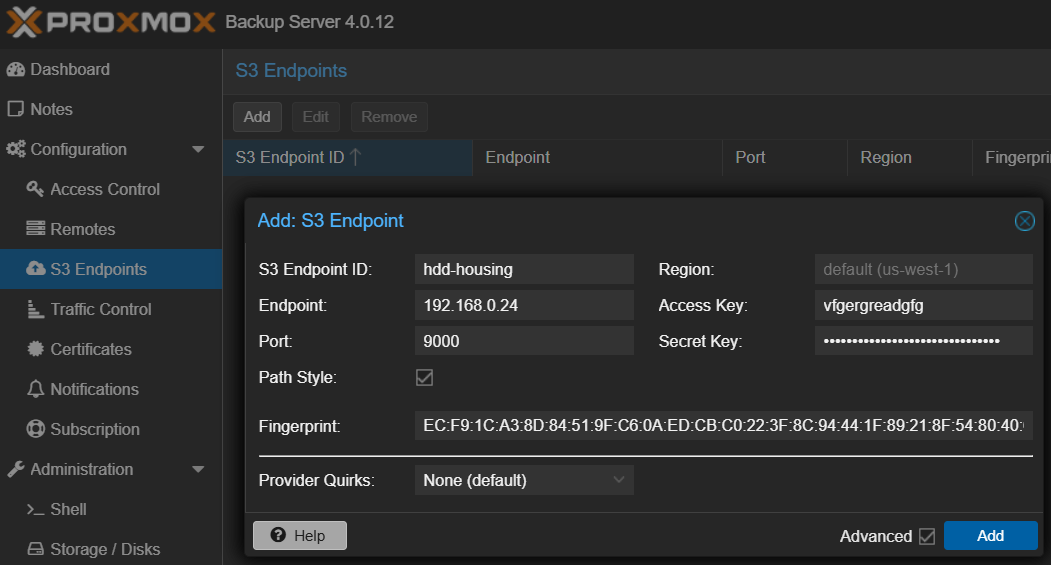
Note: How to get the fingerprint from self signed certificate is shown in Install Minio S3 Storage Server on Debian/Ubuntu
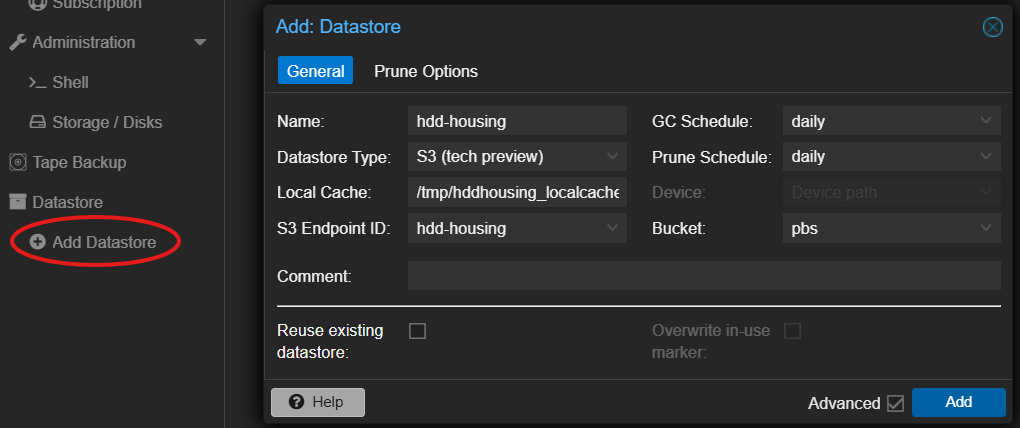
Create Datastore
mkdir /tmp/hddhousing_localcacheClick Add Datastore and configure to your needs, example:
Create namespaces
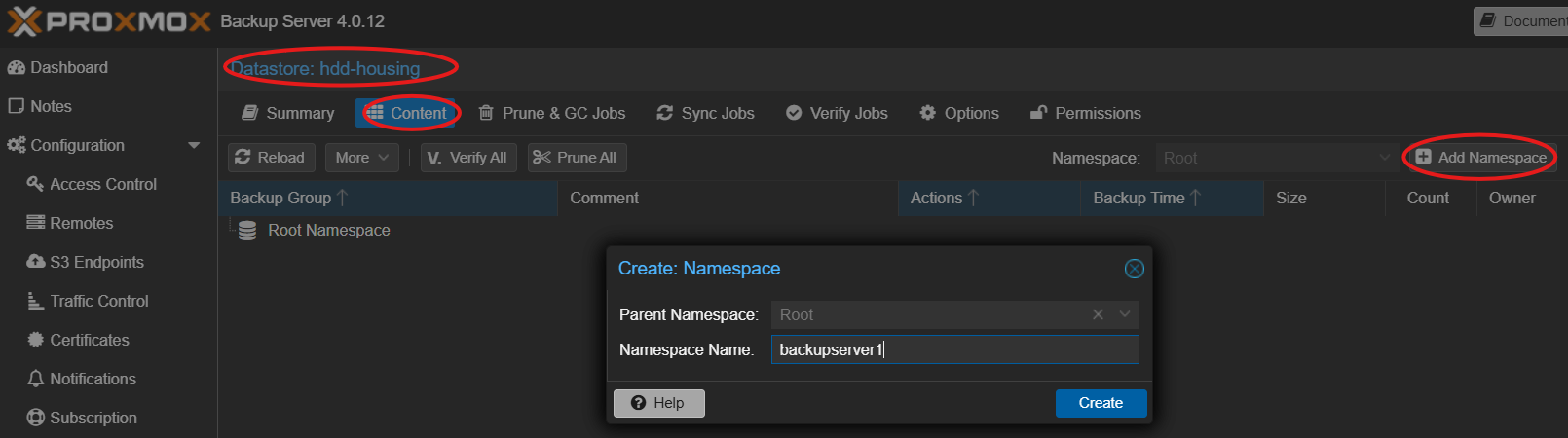
Use namespaces for Pull Sync Jobs
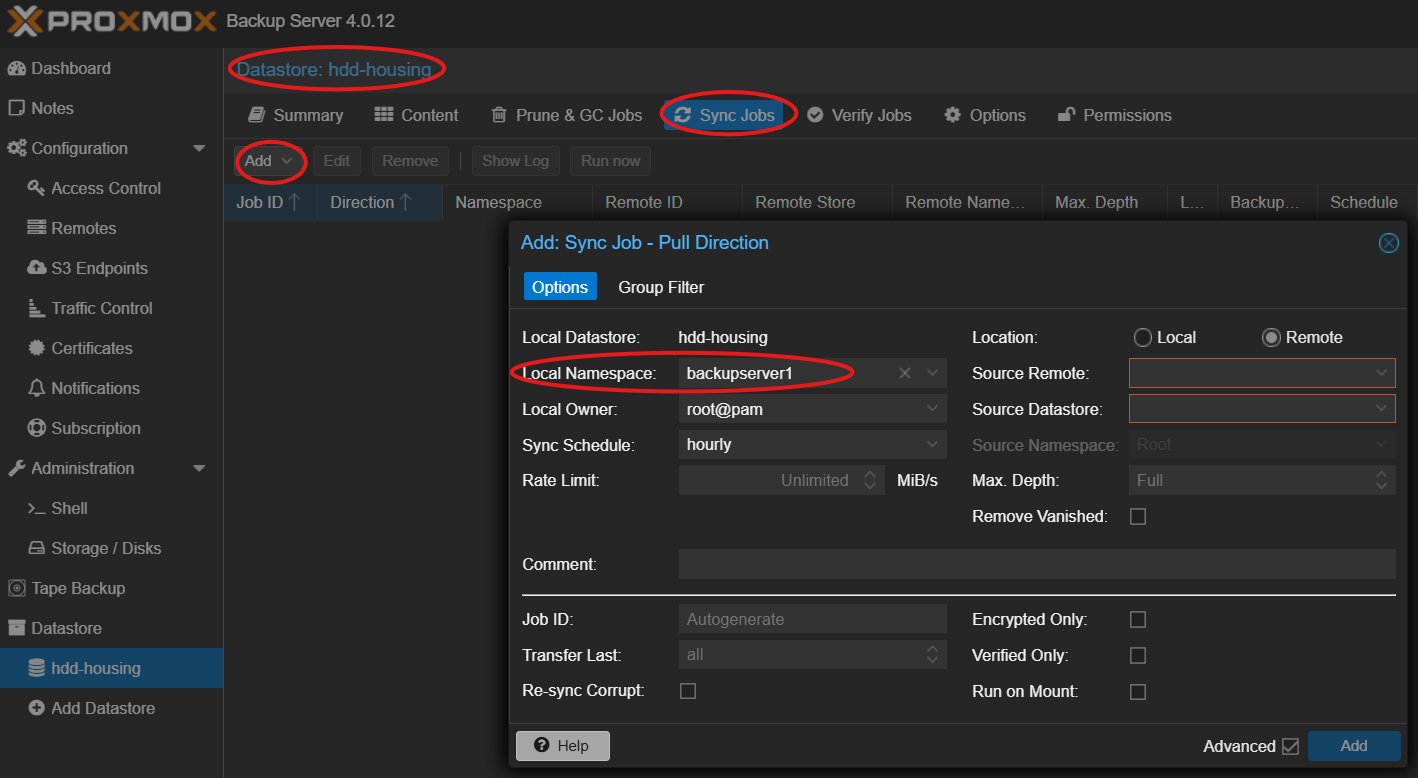
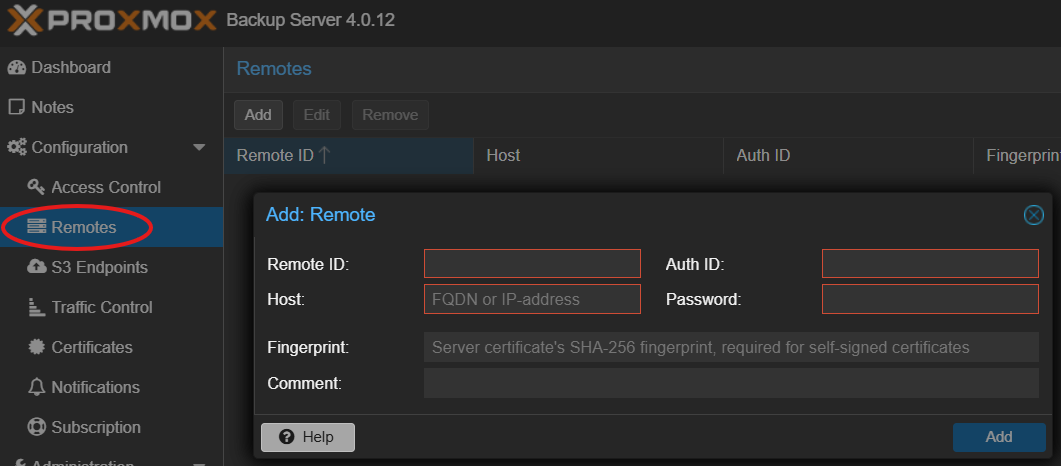
Remotes must be configured first, see screenshot below. Click the Help button for further assistance.
iCloud
This article https://www.heise.de/news/iCloud-Daten-Mac-App-sichert-Drive-und-Fotos-10508960.html (for macOS, behind paywall and in german) describes some options like
https://www.parachuteapps.com/parachute
and
https://support.bombich.com/hc/en-us/articles/20686419951767-Backing-up-the-content-of-cloud-storage-volumes
Currently we have no Apple devices to try them out ourselves.
BorgBackup
BorgBackup (Borg for short) provides:
- Space-efficient storage of backups.
- Secure, authenticated encryption.
- Compression: lz4, zstd, zlib, lzma, or none.
- Mountable backups with FUSE.
- Easy installation on multiple platforms: Linux, macOS, BSD, ...
- Free software (BSD license).
- Backed by a large and active open-source community.
It is available for
- Linux
- FreeBSD
- MacOS
Configure HDD-Housing S3 Storage in BorgBackup
Nextcloud
This articel describes how to backup Nextcloud to S3 Storage hosted by HDD-Housing.
Configure HDD-Housing S3 Storage in Rclone
1. Configure S3 Remote
Install rclone and run:
rclone configFollow the prompts to create a new remote (name it mys3) using the s3 provider.
2. Create a Backup Script
A proper backup requires a database dump before the transfer. Create a script (backup.sh):
# 1. Put Nextcloud in maintenance mode
sudo -u www-data php /var/www/nextcloud/occ maintenance:mode --on

# 2. Dump the database (example for MariaDB)
mysqldump --single-transaction -u [user] -p[password] [db_name] > /tmp/nextcloud-db.sql

# 3. Sync to S3 (Data + Config + DB Dump)
rclone sync /var/www/nextcloud/data mys3:my-bucket/data/
rclone sync /var/www/nextcloud/config mys3:my-bucket/config/
rclone copy /tmp/nextcloud-db.sql mys3:my-bucket/database/

# 4. Turn off maintenance mode
sudo -u www-data php /var/www/nextcloud/occ maintenance:mode --off
Restic
Install Restic
apt update
apt install restic
Configure
Create restic_env.sh with content:
export AWS_ACCESS_KEY_ID="access_key"
export AWS_SECRET_ACCESS_KEY="secret_key"

export RESTIC_REPOSITORY="s3:http://IP-OR-DNS:7070/bucket"

# Password for Restic-Encryption (DO NOT LOOSE! MANDATORY FOR RESTORE!)
export RESTIC_PASSWORD="good_password_that_you_never_forget"
Then init the repo
source restic_env.sh
restic init
Backup Script
Create restic_backup.sh with content:
export AWS_ACCESS_KEY_ID="access_key"
export AWS_SECRET_ACCESS_KEY="secret_key"
export RESTIC_REPOSITORY="s3:http://IP-OR-DNS:7070/bucket"
export RESTIC_PASSWORD="good_password_that_you_never_forget"

#Backups all listed paths to one restic snapshot
restic backup /etc /var/www /home/user/data